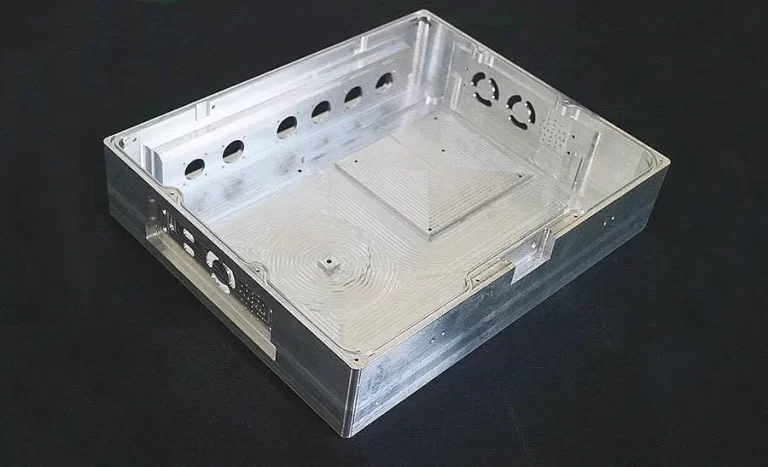
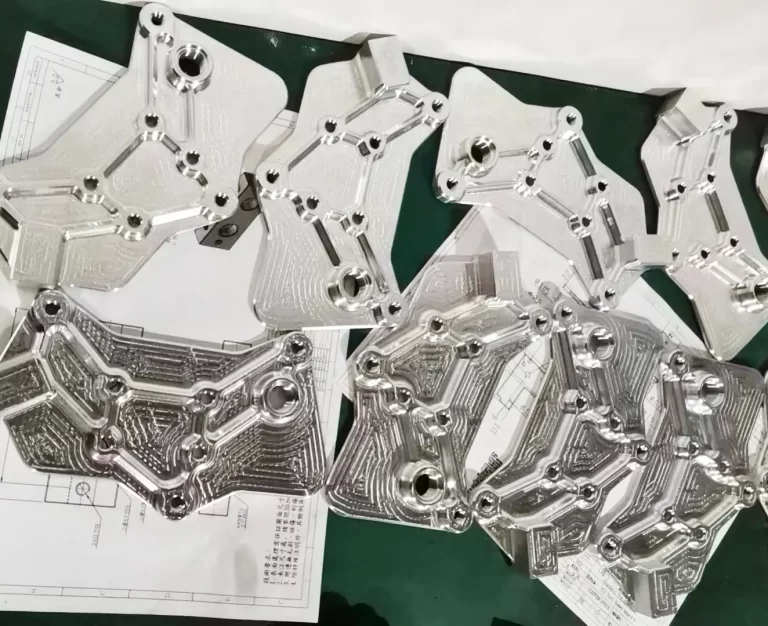
How to efficiently machine shaped parts on CNC mill-turn machines?
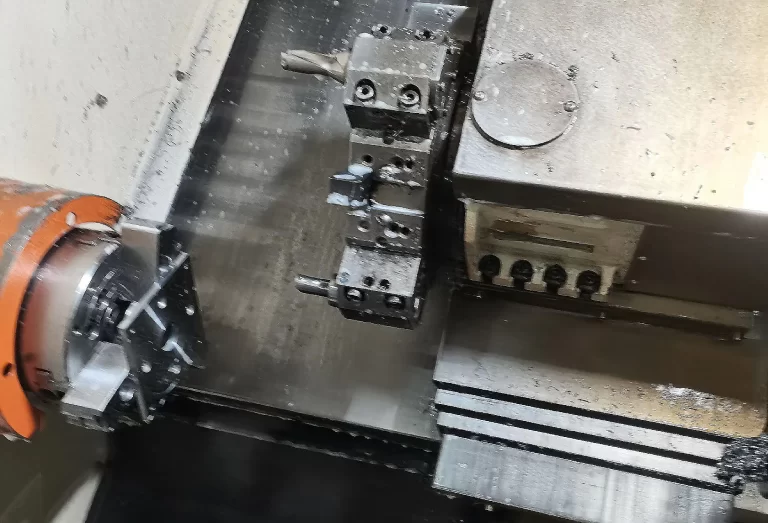


Multi-axis CNC machine tools are indispensable equipment in modern manufacturing industries. They have the advantages of high efficiency, high precision, flexibility, etc. Four-axis CNC machine tools are an important part of multi-axis CNC machine tools.
Four-axis CNC machine tools are an important part of multi-axis CNC machine tools, compared with five-axis CNC machine tools, because they are low-priced and more widely used.
Tool setting is a necessary part of machine tool processing, and it has a great impact on processing efficiency and quality.
Tool setting error is caused by a reduction in precision or by crashes and other production accidents, so it is important to study the different types of structures of the four-axis CNC machine tool setting method.
When the workpiece is not positioned in space, there are six degrees of freedom: X, Y, Z, three linear displacement degrees of freedom, and their corresponding A, B, and C, three rotary displacement degrees of freedom.
Three-axis CNC machine tools are mainly composed of three axes: the X-axis, Y-axis, and Z-axis.
These axes control the machine tool’s movement in the horizontal, vertical, and forward/backward directions.
They are suitable for machining planar and simple three-dimensional parts.
At present, four-axis CNC machine tools are more and more widely used.
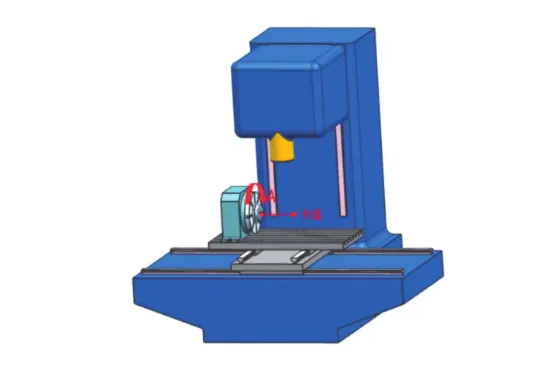
Four-axis CNC machine tools, in the three-axis CNC machine tools, can be divided into vertical four-axis CNC machine tools and horizontal four-axis CNC machine tools according to their structural characteristics based on the increase of a rotary axis.
A vertical four-axis CNC machine tool spindle perpendicular to the table, the fourth axis rotating around the X-axis and A-axis, is suitable for processing three-dimensional parts and thin-walled parts.
Vertical four-axis CNC machine tools are divided into chuck-type (Figure 1) and bridge-type (Figure 2) according to different clamping methods.
A horizontal four-axis CNC machine tool with a spindle parallel to the table and a fourth axis (B-axis) rotating around the Y-axis (Fig. 3) is suitable for machining parts such as plates, housings, seats, and so on.
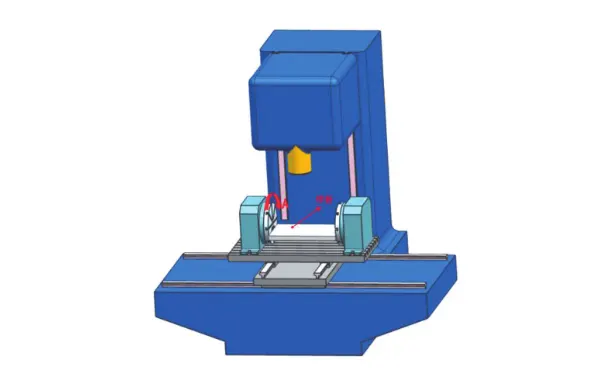
The machining coordinates of a four-axis CNC machine tool should be placed at the centerline of the fourth axis of rotation.
Therefore, the purpose of four-axis CNC machine tool setting is to find the center of the fourth axis of rotation within the machine coordinate system.
It also aims to determine the relative position between the workpiece tool setting reference point and the origin of the machining coordinates.
Before tool setting, the installation accuracy of the four-axis rotary table should be calibrated.
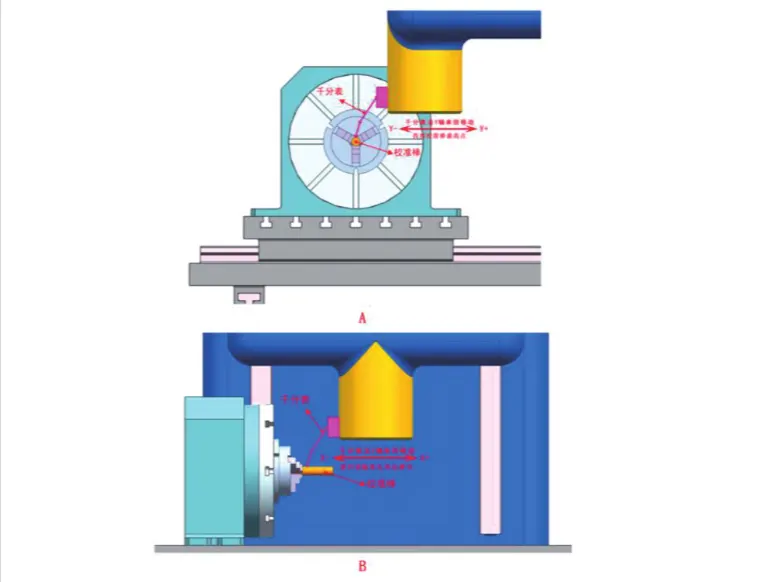
Clap the calibration bar on the chuck and attach the micrometer to the spindle as shown in Fig. 4A. Manually move the machine tool so that the meter needle touches the busbar near the calibration bar.
Keep the machine tool X-axis and Z-axis positions unchanged. Move back and forth along the Y-axis. Using the micrometer reading, find the highest point of the standard bar.
Keeping the machine’s Y-axis and Z-axis in the same position, move back and forth along the X-axis as shown in Fig. 4B.
If the micrometer reading changes, adjust the position of the 4-axis rotary table. Continue adjusting until the change is within the permissible range.
This ensures that the centerline of the 4-axis rotary table is parallel to the machine’s X-axis. After completing the calibration and re-checking, fix the 4-axis rotary table in place.
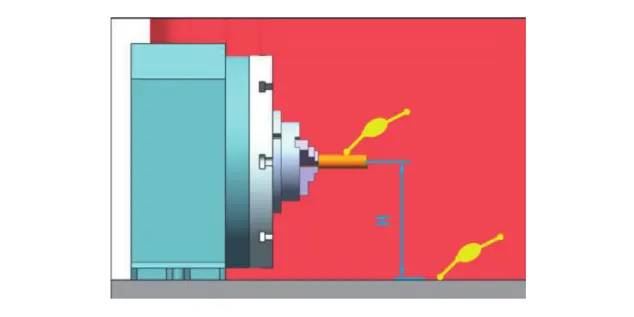
Align the Z coordinates of the rotary center of the 4-axis rotary table. Attach a micrometer to the spindle and manually move the machine so that the micrometer touches the table to zero the relative coordinates.
Move the machine again so that the micrometer touches the highest point of the calibration bar (its value should be the same as when it touches the table surface).
Then, the Z relative coordinate is Z relative, assuming that the diameter of the calibration bar is D and the distance between the center of rotation of the four-axis and the table surface is H = Z relative—D/2, as shown in Figure 5.
The tool will be installed in the spindle, the tool touches the table surface, the mechanical coordinate value z1, assuming that the tool length of L, the four-axis rotary center of the Z-direction of the mechanical coordinate value z0 = z1 + H – L.
The Y-coordinate of the tool setting 4-axis rotary center. The tool setting tool is mounted on the spindle.
To maintain the same position of the Z-direction coordinates, it touches two points on the calibration bar in the Y-direction—one inside and one outside.
The mechanical coordinate values y₁ and y₂ are obtained, respectively. The Y-direction mechanical coordinate value of the rotary center of the four-axis rotation is calculated as:
y₀ = (y₁ + y₂) / 2.
The origin of the machining coordinate system of a 4-axis CNC machine should be set at the rotary center of the 4-axis, so z0 and y0 can be entered into the Z and Y boxes of the machine’s machining coordinate system, respectively.
Clamp the workpiece blank on the 4-axis chuck to ensure that the workpiece’s rotary center coincides with the machine tool’s rotary center.
If the workpiece is long or not rigid enough, a 4-axis center or auxiliary support must be installed at the end of the workpiece.
Usually, the workpiece to be machined uses a reference plane on the blank. The reference plane is either parallel to the machine tool’s Y-axis or set at a particular angle.
This is done when the A-axis’s position is at the A-axis machining zero point. The mechanical coordinate value of the A-axis, A₀, is then input into the A-box of the machine tool’s machining coordinate system.
The workpieces machined by chuck-type 4-axis CNC machine tools are generally rotationally symmetrical parts. Suppose there is no A-axis home position datum plane for such workpieces.
In that case, the A-axis home position can be exempted from the A-axis home position tool setting, and the A-value of the machine tool’s machining coordinate system is entered into the machine tool’s A-value box.
According to the 3-axis tool setting method, find the mechanical coordinates of X, Y, and Z of the reference point of the tool setting on the workpiece.
X-origin, y-origin, and z-origin are input into the X box of the machine tool’s machining coordinate system.
The y-origin and z-origin are compared with the y0 and z0 of the four-axis rotary center of the machine tool, and the deviation value is calculated according to the following formula:
△y = y0 – y0 – z0
△y = y0 – y-origin, △z = z0 – z-origin, and inform the programmer about △y and △z.
If the workpiece blank is rotationally symmetric, △y = 0 and △z = 0 when the reference point for tool setting is on the rotational center of the workpiece blank.
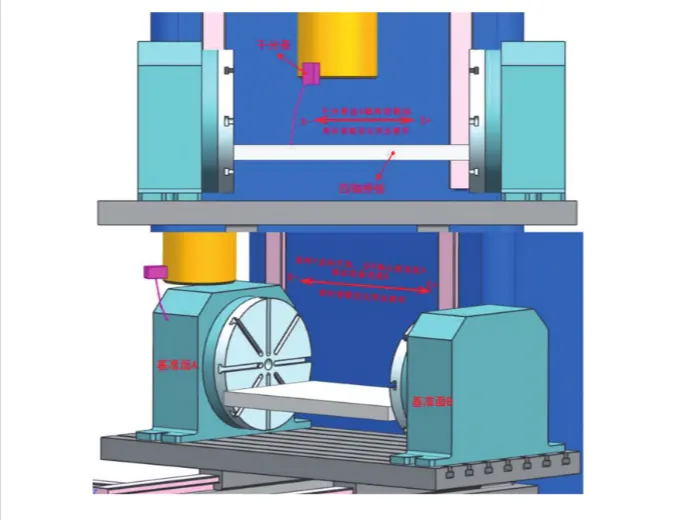
Before tool setting, the installation accuracy of the 4-axis bridge plate should be calibrated. Attach the micrometer to the spindle, as shown in Figure 6.
Manually move the machine so that the micrometer needle touches the upper surface of the bridge plate. Keep the positions of the Y-axis and Z-axis unchanged.
Move back and forth along the X-axis. If there is any change in the micrometer reading, adjust the position of the 4-axis rotary table. Continue adjusting until the shift in the micrometer reading is within the permissible range.
Move the machine manually so that the dial gauge touches the datum plane A of the 4-axis, keep the Y-axis and Z-axis unchanged, and move it along the X-axis to the datum plane B of the 4-axis rotary table.
If the micrometer readings on the two datum planes change, adjust the position of the 4-axis rotary table until the change is within the permissible range.
Make sure the centerline of the 4-axis rotary table is parallel to the machine’s X-axis. Then, fix the 4-axis rotary table and the bridge plate in place. Finally, carry out a recheck to confirm accuracy.
Attach a micrometer to the spindle. Manually move the machine so that the micrometer needle touches the upper surface of the bridge plate.
Keep the X-axis and Z-axis positions of the machine constant. Move back and forth along the Y-axis.
If there is any change in the micrometer reading, adjust the angle of the A-axis. Continue adjusting until the micrometer reading changes fall within the permissible range.
Then, input the mechanical coordinate value of the A-axis, A₀, into the A-box of the machine tool’s machining coordinate system.
Check the Y coordinate of the rotary center of the four axes.
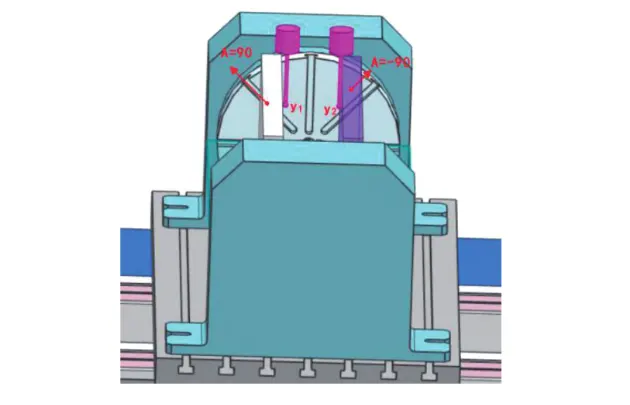
Install the tool on the spindle, as shown in Figure 7. Rotate the A-axis to the absolute coordinate of 90°.
Let the tool touch the surface of the bridge plate to obtain the Y-direction mechanical coordinate y₁.
Then, rotate the A-axis to the absolute coordinate of -90°. Let the tool touch the surface of the bridge plate again to obtain the Y-direction mechanical coordinate y₂.
The Y-direction mechanical coordinate of the center of rotation of the four-axis is calculated as:
y₀ = (y₁ + y₂) / 2.
The Z-coordinate of the center of rotation of the four axes of the tool.
Assuming that the tool’s diameter is D, the distance between the 4-axis center of rotation and the surface of the bridge plate is H = ( | y2 – y1| + D) / 2.
Similar to the Z-direction tool setting of the rotary table 4-axis CNC machine, the tool setting is mounted on the spindle, and the tool setting touches the surface of the bridge plate to get the mechanical coordinate value z1.
Assuming that the length of the tool setting is L, the Z-direction mechanical coordinate value of the 4-axis rotary center z0 = z1 + H – L.
To find the mechanical coordinates of the X, Y, and Z datum points on the workpiece, follow the 3-axis tool setting method.
x-origin, y-origin, z-origin, and x-origin are entered directly into the X-box of the machine tool’s machining coordinate system.
The y-origin and z-origin are compared with the y0 and z0 of the four-axis rotary center of the machine, and the deviation values are calculated according to the following formula:
△y = y0 – y-origin, △z = z0 – z-origin, and △y and △z are told to the programmers.
Before tool setting, calibrate the mounting accuracy of the 4-axis rotary table.
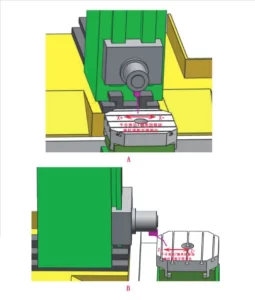
With the micrometer attached to the spindle, as shown in Fig. 8A, manually move the machine so that the needle touches the table surface.
Keep the machine’s Y-axis and Z-axis positions unchanged, and move it back and forth along the X-axis, observing the change in the micrometer’s reading.
Keep the machine X-axis and Y-axis in the same position, move the machine back and forth along the Z-axis as shown in Fig. 8B, and observe the change of the micrometer reading.
If the micrometer reading changes, adjust the position of the 4-axis rotary table. Make sure the table surface becomes parallel to the machine spindle.
Continue adjusting until the change in the micrometer reading is within the allowable range. Then, fix the position of the 4-axis rotary table and perform a double-check to confirm accuracy.
Install the tool setting tool on the table and attach the micrometer to the spindle. Manually move the machine so that the needle touches the side of the tool setting tool as shown in Fig. 9.
Keep the machine’s X-axis and Y-axis positions unchanged. Then, move back and forth along the Z-axis.
If the micrometer reading changes, adjust the angle of the B-axis accordingly. Continue this process until the reading no longer changes.
At this point, the value of the B-axis mechanical coordinate, B₀, can be entered into the B-box of the machine tool’s machining coordinate system.

Check the Y coordinate of the rotary center of the four axes.
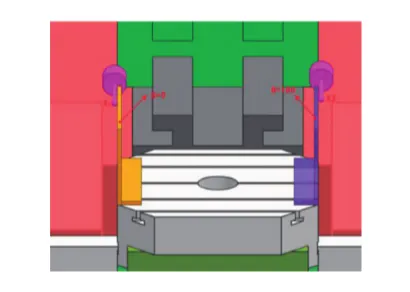
The tool setting tool is installed on the spindle, as shown in Figure 10. The B-axis is rotated to the absolute coordinate of 0°.
The tool setting tool then touches the surface of the tooling equipment to obtain the X-direction mechanical coordinate x₁.
Next, the A-axis is rotated to the absolute coordinate of 180°. The tool setting tool again touches the surface of the tooling equipment to obtain the X-direction mechanical coordinate x₂.
The X-direction mechanical coordinate of the center of rotation of the 4th axis is calculated as:
x₀ = (x₁ + x₂) / 2.
The Z-coordinate of the tool setting is the 4-axis rotary center.
The B-axis is rotated to the absolute coordinate of 90°, the tool setting tool touches the surface of the tool setting fixture, and the Z-direction mechanical coordinate z1 is obtained.
Assuming that the diameter of the tool setting tool is D and the length is L, the Z-direction mechanical coordinate value of the four-axis rotary center is z0 = z1 – | x1 – x0| – L + D/ 2.
According to the 3-axis tool setting method, find the mechanical coordinates of X, Y, and Z of the reference point of tool setting on the workpiece.
X-origin, y-origin, z-origin, and y-origin are inputted into the X box of the machine tool’s machining coordinate system.
The x-original and z-original are compared with the x0 and z0 of the machine tool’s four-axis rotary center, and the deviation values are calculated according to the following formula:
△x = x0—x-original, △z = z0—z-original, and △x and △z are informed to the programmer.
The types and structures of four-axis CNC machine tools used in actual production are different, as are the tool setting methods.
The study of the tool setting method of 4-axis CNC machine tools can provide a practical reference for the tool setting methods of multi-axis CNC machine tools with different structural types.
It helps save the cost of equipment upgrades while still meeting production demands. Additionally, it improves production efficiency and reduces overall production costs.